
Description
TS-431K
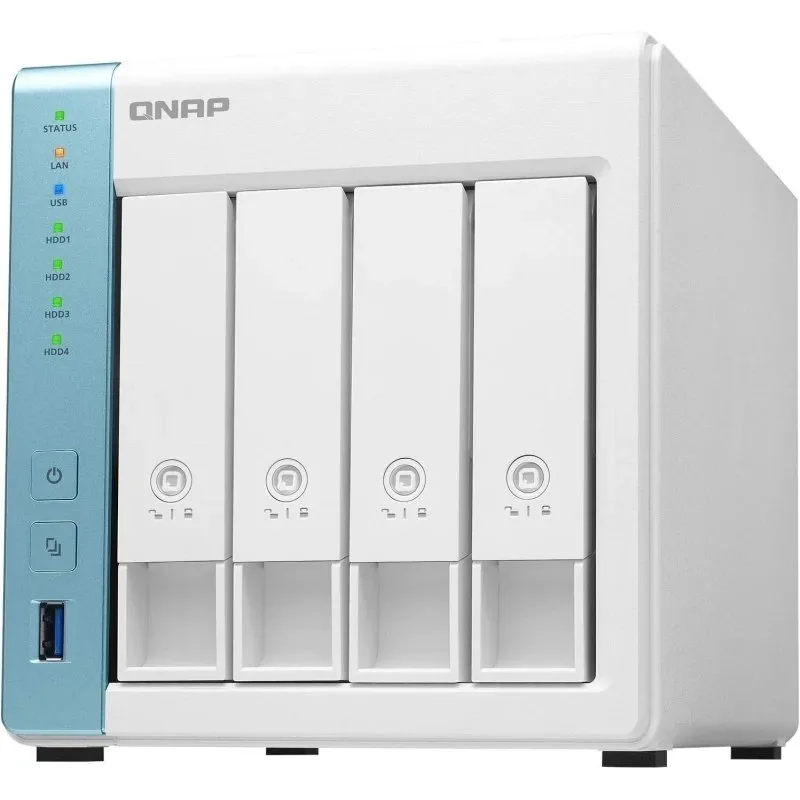
The TS-431K network-attached storage is equipped with a quad-core processor with a clock speed of 1.7 GHz and features a compact case design that easily fits into any interior while taking up minimal space. Lockable trays prevent accidental disk removal, and consequently, data loss. The TS-431K provides comprehensive local, remote, and cloud backup, as well as secure snapshot technology to create a reliable backup and disaster recovery plan. HBS performs backup and synchronizes NAS data with other network storage or cloud storage. Snapshots protect files and data from accidental deletion and malware attacks. Centralized multimedia data storage allows convenient access and cataloging of photos, videos, and music. Connect external drives, card readers, printers, and UPS to the USB 3.2 Gen 1 port for high speed. The myQNAPcloud service provides convenient internet access for managing and sharing files with the network storage.
File Station provides centralized file management on the NAS, connected devices, and cloud services, simplifying data management and saving time.
File Station
File Station manages files stored on your QNAP NAS, connected cloud services, USB drives, and mobile devices. Access all your data from a single application.
Qfile
The Qfile mobile app provides access to files on the network storage from a mobile device and also performs backups, such as media galleries. Protect important data with snapshots. Snapshots record the system state at a specific point in time. If an unforeseen situation arises, you can revert to the previous state of the data recorded earlier in a snapshot. The Storage Manager offers an easy-to-use snapshot creation tool for backing up and restoring disk volumes and LUNs at any time, helping to prevent data loss or unwanted changes.
Multi-level backup, access, and file synchronization
The TS-431K supports common file sharing protocols SMB/CIFS, AFP, and NFS for Windows®, Mac®, and Linux®/UNIX® devices. Combined with the Qsync utility (which turns QNAP NAS into a secure high-performance data processing center for file synchronization), any uploaded file to the network storage becomes accessible to all connected devices, such as computers, laptops, and mobile devices. HBS (the backup program built into the QTS operating system) will perform backup and synchronization of data between the TS-431K and another QNAP storage, remote server, or cloud storage for disaster recovery. The built-in QuDedup technology significantly enhances efficiency and disk space utilization when storing multiple versions of data by deduplicating backup data. Install the QuDedup Extract Tool on your computer to restore deduplicated files to their original state.
Optimized backup tools for data protection
The TS-431K network storage offers various backup solutions. The NetBak Replicator application from QNAP supports real-time and scheduled backup tasks on Windows OS. There is also Time Machine backup for Apple computers running Mac OS X on the TS-431K.
Convenience of multimedia work
The TS-431K has a wide range of multimedia applications: Photo Station, Video Station, and Music Station, and also supports the installation of Plex Media Server.
NAS as a platform for multiple OS
Virtualization Station and Container Station provide comprehensive solutions for creating virtualized environments.
Photo Station
The application helps organize a photo and image archive. Provide access to your friends and acquaintances or share photos on social networks. Install the Qfile or Qphoto mobile apps on your mobile device to send or view photos on the TS-431K.
Video Station
Categorize, tag, view, and sort video content, and stream it via DLNA®, Apple TV (through Qmedia), and Chromecast™* to playback devices.
Music Station
Categorize your music collection with options for album cover uploads and playlist settings. Internet radio stations are also available here.
Plex Media Server
Install Plex Media Server on the TS-431K and stream media files from your NAS to Roku® players, Apple TV (through Qmedia), Google Chromecast™, Amazon Fire TV®, smartphones, tablets, and DLNA® devices.
Intelligent image management with QuMagie
The QuMagie Core AI feature catalogs photos by recognizing people's faces, identifying objects, and distributing files into albums, including by geotags. QuMagie also sorts images by timeline, adjusts album covers, and offers various search tools.
```
Specifications
- Manufacturer
- Network
- Model
- Network Storage QNAP TS-431K
Product documents and safety information
- Manufacturer
- Network
- Safety information
- Available on request from info@farkasltd.com before you submit your request.
Warranty and returns
Consumers have legal rights if goods are faulty, separate from any manufacturer warranty. See Warranty and Returns & Refunds. To withdraw from a purchase use Withdraw from contract.